Perché la maggior parte dei consigli sulla digitazione non aiuta
Cerca "come digitare più velocemente" e troverai ovunque la stessa lista riciclata: pratica quotidiana, usa tutte e dieci le dita, non guardare la tastiera. Vero, ma inutile senza contesto. È come dire a qualcuno di "migliorare semplicemente" nel tennis.
La velocità di digitazione è un'abilità motoria. Si sviluppa allo stesso modo di qualsiasi abilità motoria — attraverso pratica deliberata, meccanica corretta e abbastanza ripetizioni perché il corpo smetta di pensare consapevolmente a ciò che sta facendo. Quel processo ha una struttura specifica, e capirla cambia il modo in cui ti eserciti.
Queste dieci tecniche seguono quella struttura. Sono ordinate intenzionalmente: le prime costruiscono la base da cui dipendono le successive.
1. Correggi la postura prima di correggere le dita
Questo viene prima perché tutto il resto dipende da esso.
Siediti con i piedi piatti sul pavimento, la schiena supportata e gli avambracci approssimativamente paralleli al pavimento. La tastiera dovrebbe essere ad un'altezza in cui i gomiti sono vicini a un angolo di 90 gradi. I polsi devono essere neutri — non piegati verso l'alto verso i tasti, non appoggiati pesantemente sulla scrivania.
Non si tratta di comfort a breve termine. Si tratta di sostenibilità. La postura scorretta crea affaticamento e tensione che ti rallentano e, nel corso degli anni, causano veri infortuni. Un dattilografo con una meccanica eccellente ma una postura sbagliata si ferma su un plateau, perché è il corpo stesso a mettersi di traverso.
Dedica cinque minuti adesso a sistemare la postazione, prima di qualsiasi altra cosa. La differenza si sente già nella stessa sessione.
2. Padroneggia la riga di base — completamente
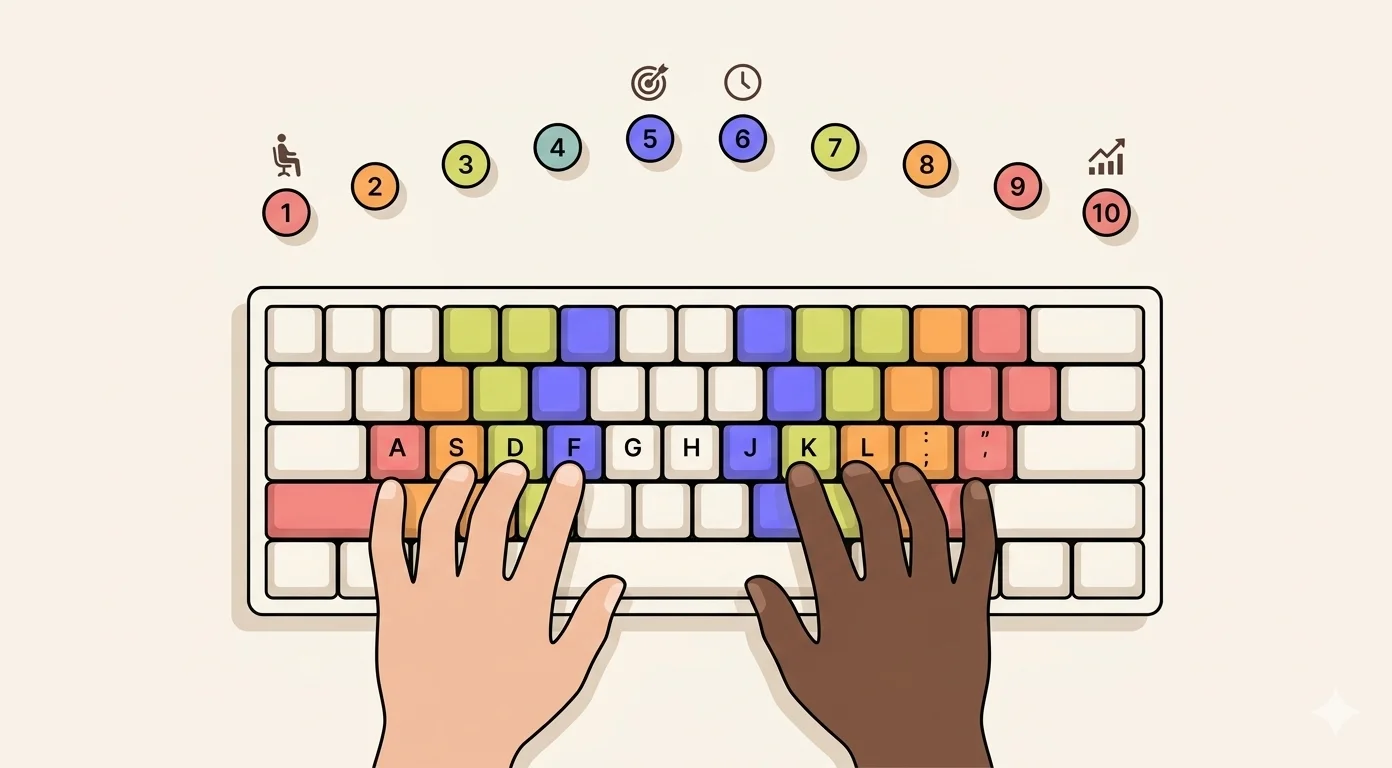
La riga di base è dove vivono le tue dita: ASDF per la mano sinistra, JKL; per la destra. Ogni altro tasto sulla tastiera è un movimento da questa posizione e un ritorno ad essa. Se quegli otto tasti sono ancora incerti, parti dalla guida ai tasti della riga di base.
La maggior parte dei dattilografi autodidatti ha un rapporto vago con la riga di base. La usano ogni tanto, se ne allontanano di continuo e finiscono con le dita sparse sulla tastiera in una posizione diversa ogni volta.
La riga di base deve essere automatica. Le dita devono tornarci dopo ogni battitura senza pensiero consapevole, come la mano di un musicista torna alla posizione naturale dello strumento tra le note.
Pratica gli esercizi sulla riga di base finché non riesci a digitare ASDF JKL; e ogni combinazione di quelle lettere a 50+ PPM con il 98% di precisione prima di preoccuparti del resto della tastiera. È questa base a rendere stabile tutto ciò che le sta sopra.
3. Impara l'assegnazione corretta delle dita per ogni tasto
Ogni tasto sulla tastiera ha un dito assegnato. La maggior parte dei dattilografi autodidatti ha sviluppato le proprie assegnazioni idiosincratiche — che di solito comportano più allungamento, movimenti più goffi e più incoerenza rispetto al layout standard.
Le assegnazioni standard riducono al minimo il movimento delle mani e distribuiscono il carico fra le dita. Esistono perché decenni di analisi e di uso hanno dimostrato che funzionano.
I due tasti più frequentemente sbagliati:
- B appartiene all'indice sinistro, non destro
- Y appartiene all'indice destro, non sinistro
Passa in rassegna l'intero layout e confronta ogni dito con la mappa standard. Individua dove stai deviando. Quelle deviazioni sono limiti di velocità invisibili: non te ne accorgi finché non provi a superare una certa soglia di PPM e scopri che non ci riesci.
4. Smetti di guardare la tastiera. Completamente.
Non perlopiù. Non tranne che per le parole difficili. Completamente.
Ogni sguardo alla tastiera è un piccolo tradimento della memoria muscolare che stai cercando di costruire. Stai dicendo al tuo cervello: non prenderti la briga di impararlo, tanto lo guardo. Il cervello obbedisce e non interiorizza mai del tutto le posizioni dei tasti.
La transizione è scomoda. La velocità scenderà, a volte in modo drastico. Se digiti a 40 PPM guardando, nei primi giorni alla cieca potresti scendere a 15 PPM. È il processo che funziona correttamente, non che fallisce.
Se non riesci a resistere a guardare, copri le mani con un foglio di carta o un piccolo panno. Sembra estremo. Elimina del tutto l'opzione, e nel giro di una settimana le dita cominciano a imparare perché non hanno altra scelta.
5. Rallenta per accelerare
Questo è controintuitivo e quasi universalmente ignorato, ecco perché la velocità di digitazione della maggior parte delle persone si appiattisce.
Quando digiti più veloce di quanto il tuo livello attuale sostenga, fai errori. Ti fermi a correggerli, riscrivi parole, perdi il ritmo. La velocità netta è spesso più bassa di quella che avresti avuto scrivendo con cura a un ritmo inferiore. Peggio ancora, stai rinforzando gli schemi sbagliati: le dita imparano a sbagliare più in fretta.
Il principio dell'apprendimento motorio è chiaro: lento è fluido, fluido è veloce. Si accede alla velocità alta padroneggiando prima quelle basse.
Imposta il tuo obiettivo al ritmo in cui puoi mantenere il 95% di precisione. Tieniti lì. Resisti alla tentazione di correre. Quando il 95% di precisione diventa facile a quel ritmo, aumenta leggermente la velocità e ripeti. Il tuo tetto sale più in fretta così di quanto salga forzando.
6. Pratica in sessioni quotidiane brevi, non in sessioni settimanali lunghe
Venti minuti di pratica quotidiana batte una sessione di due ore una volta alla settimana di un margine significativo. Non è un'affermazione motivazionale: è il modo in cui la memoria motoria si consolida.
La memoria muscolare si forma durante il riposo, non durante la pratica. La pratica codifica lo schema; il sonno e le pause lo consolidano. Una sola sessione lunga ti dà una finestra di consolidamento. Sette sessioni brevi te ne danno sette.
L'altro problema delle sessioni lunghe è la stanchezza. Dopo 40-50 minuti di pratica concentrata la precisione cala e cominci a rinforzare schemi stanchi e sciatti. Le sessioni brevi tengono alta la qualità dall'inizio alla fine.
Inserisci 15-20 minuti di pratica deliberata nella tua routine quotidiana. Non digitazione generica — pratica deliberata che mira a competenze specifiche o aree problematiche. Aprire con qualche esercizio di riscaldamento per la digitazione rende la sessione produttiva più in fretta.
7. Punta specificamente ai tuoi tasti deboli
La maggior parte dei programmi di miglioramento procede in modo lineare lungo la tastiera. Funziona per i principianti, ma manca l'occasione principale per chi è a livello intermedio.
Una volta che digiti a 50-60 PPM, il collo di bottiglia non è il tuo tasto medio. È un piccolo insieme di tasti problematici e combinazioni di tasti che ti rallentano ogni volta che appaiono. Per la maggior parte delle persone si tratta della riga dei numeri, della punteggiatura, delle maiuscole fatte con il tasto Maiusc sbagliato e di una manciata di lettere che non si sono mai sistemate del tutto.
Identifica i tuoi punti deboli attraverso un test di digitazione che mostra la precisione per tasto, non solo il punteggio complessivo. Poi esegui esercizi che mirano specificamente a quei tasti. Trenta minuti di pratica mirata sui tuoi quattro tasti peggiori faranno per la tua velocità più di trenta minuti di digitazione generica.
8. Usa il tasto Maiusc corretto — ogni volta
Questa è piccola, invisibile e ha un impatto reale.
La regola: usa il tasto Maiusc opposto alla lettera che stai mettendo in maiuscolo. Metti in maiuscolo una lettera sul lato destro della tastiera (U, I, O, P e altre)? Il tuo mignolo sinistro tiene Maiusc. A sinistra (W, E, R, T e altre)? Il tuo mignolo destro tiene Maiusc.
La maggior parte degli autodidatti usa sempre il Maiusc sinistro, il che significa che la mano sinistra tiene un modificatore e digita una lettera nello stesso momento. Il risultato è una goffaggine piccola ma costante, che ricompare in ogni parola con la maiuscola.
Esercitati proprio su questo, con un elenco di parole che iniziano per maiuscola. Nel giro di pochi giorni il Maiusc corretto diventa automatico e la goffaggine sparisce per sempre.
9. Digita parole e frasi reali, non solo esercizi
Gli esercizi con le lettere sono essenziali per costruire il posizionamento iniziale dei tasti. Ma c'è un limite a ciò che insegnano.
La digitazione reale coinvolge forme di parole, non singole lettere. Chi digita bene non pensa alle singole battute più di quanto un lettore esperto pensi alle singole lettere. Elabora blocchi interi, parole comuni, coppie frequenti, frasi familiari, come singoli movimenti fluidi.
Questa capacità di raggruppare si sviluppa solo praticando su testo reale, e scegliere cosa scrivere quando ti eserciti conta quanto il tempo che ci dedichi. Dopo aver costruito un solido posizionamento dei tasti con gli esercizi, sposta la maggior parte del tempo di pratica sulla digitazione di vere frasi, paragrafi e articoli. Più il contenuto è vario e naturale, meglio è. Il cervello costruisce gli schemi che incontra più spesso, quindi esercitati su testi che somigliano a quello che scrivi davvero al lavoro o a scuola.
10. Tieni traccia dei tuoi progressi con numeri reali
La motivazione è più facile quando il miglioramento è visibile. Ma soprattutto, misurare rivela se quello che stai facendo funziona davvero.
Misura PPM e precisione a un intervallo fisso — una volta alla settimana, stesso test, stesse condizioni. I PPM netti (velocità meno la penalità per gli errori) sono il numero onesto; i PPM lordi nascondono i problemi di precisione.
Il progresso nella digitazione non è lineare. Incontrerai plateau che possono durare una o due settimane prima di un salto. Saperlo in anticipo evita di abbandonare un metodo che sta funzionando solo perché i risultati non arrivano ogni giorno, e ci sono modi precisi per rompere un plateau di velocità quando ne dura uno più lungo.
Una traiettoria ragionevole per un adulto che parte da zero:
- Settimane 1-2: La velocità scende mentre smetti di guardare. Previsto.
- Settimane 3-4: La velocità torna al livello iniziale. La riga di base diventa automatica.
- Settimane 5-8: La velocità supera il massimo precedente. 40-50 PPM realistico.
- Mesi 3-4: 60-70 PPM accessibile con pratica quotidiana costante.
- Mese 6+: 80+ PPM raggiungibile per la maggior parte delle persone con sforzo sostenuto.
I numeri contano meno della direzione. Se stai misurando e i numeri si muovono, il metodo funziona.
La tecnica che non è in questa lista
Non esiste una scorciatoia. Nessuna tastiera, nessuna app, nessun trucco sostituisce le ore di pratica deliberata richieste dallo sviluppo delle abilità motorie. Quello che queste tecniche fanno è rendere quelle ore più efficienti, così ottieni più miglioramento per sessione di quanto ne otterresti da una pratica disordinata.
La vera variabile non è il talento. È la costanza. Quindici minuti al giorno, applicati correttamente, per due o tre mesi. Questo è l'investimento. Il ritorno è un'abilità che lavora in silenzio, sullo sfondo, per tutto il resto della tua vita lavorativa.
Se vuoi che quei quindici minuti siano strutturati invece che improvvisati, Typiq è un tutor desktop costruito esattamente su queste regole: prima la fila base, il dito corretto mostrato per ogni tasto in tempo reale, precisione prima della velocità. Funziona offline su Mac, Windows e Linux, costa 22,99 € una tantum senza abbonamento, e c'è una prova gratuita prima dell'acquisto.
Domande frequenti
Quanto tempo ci vuole per raddoppiare la velocità di digitazione? Per la maggior parte degli adulti, passare da 35-40 PPM a 70-80 PPM richiede da 2 a 3 mesi di sessioni quotidiane di 15-20 minuti. Il primo mese è spesso scoraggiante, perché stai disimparando vecchie abitudini prima di costruirne di nuove. I progressi accelerano parecchio nel secondo mese, una volta che la base è a posto.
Il tipo di tastiera influisce sulla velocità di digitazione? Marginalmente. Le tastiere meccaniche forniscono un feedback tattile più chiaro, che alcuni trovano utile per la precisione. Ma il collo di bottiglia fondamentale è la tecnica, non l'hardware. Chi ha un'ottima tecnica di dattilografia batte chi cerca i tasti su qualsiasi tastiera.
Vale la pena imparare a digitare più velocemente se già digito a 50 PPM? Sì. Il miglioramento da 50 a 70 PPM vale in proporzione quanto quello da 30 a 50. A 70+ PPM, la digitazione smette di essere un'attività consapevole durante i compiti di scrittura: le mani stanno al passo con i pensieri. Sotto quella soglia resta un attrito costante e sottile che influenza tutto ciò che scrivi.
Dovrei usare un'app di tutoraggio o esercitarmi da solo? Un programma di digitazione strutturato è significativamente più efficace per la maggior parte delle persone, specialmente nelle prime fasi. La progressione conta: introdurre i tasti nell'ordine giusto, dare un feedback mirato, misurare la precisione tasto per tasto. Senza struttura, la pratica autogestita finisce per rinforzare le abitudini esistenti invece di costruirne di nuove.
Gli adulti più anziani possono imparare a digitare più velocemente? Sì. L'apprendimento motorio rallenta un po' con l'età, ma non si ferma. Gli adulti che partono subito con la tecnica corretta spesso progrediscono più in fretta dei più giovani, perché portano nella pratica più disciplina e più motivazione. I tempi possono allungarsi leggermente, ma il risultato finale è lo stesso.